Assistance Configuring Graphs

Formidable Forms Released
April 11, 2026 22:41:00
kaljade
Topics: 1
Messages: 6
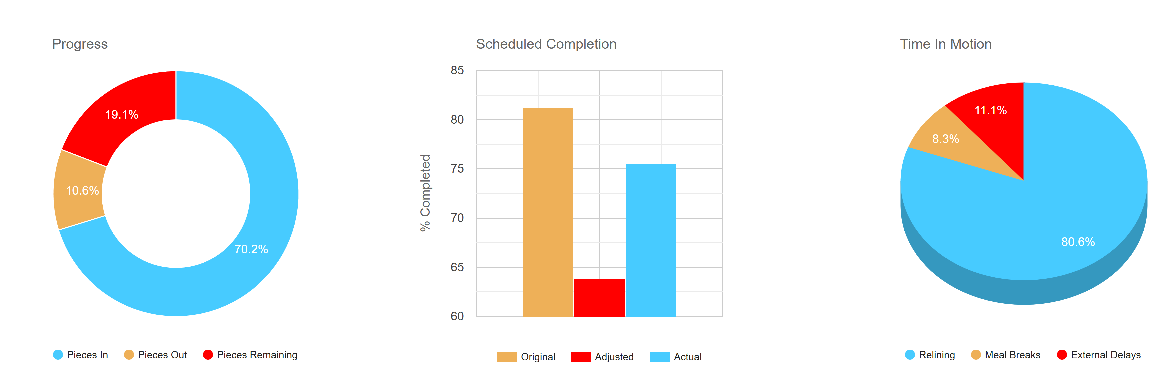
I'm trying to replicate the following graphs in my PDF export:

Progress:
[frm-graph fields="41,40,71" type="pie" data_type="total" title="Progress" colors="#47cbff,#eeb058,#ff0000" pie_hole="0.6" show_key="1" legend_position="bottom" legend_size="10"]

Scheduled Completion:
[frm-graph fields="84,85,43" x_axis="75" x_labels_size="0.1" type="column" data_type="total" title="Scheduled Completion" colors="#eeb058,#ff0000,#47cbff" show_key="1" legend_position="bottom" legend_size="10" y_title="% Completed" x_title=""]

Time In Motion:
[frm-graph fields="81,82,83" type="pie" data_type="total" title="Time In Motion" colors="#47cbff,#eeb058,#ff0000" show_key="1" legend_position="bottom" legend_size="10" is3d="true"]

See attached screensoht of how they display in the form.

Any assistance would be greatly appreciated.

Cheers,

Kal
April 12, 2026 20:46:20
E2Pdf
Topics: 7
Messages: 3637
Support
Hello,

Unfortunately, displaying data in PDFs in the same way as the [frm-graph] shortcode is currently tricky. We are actively testing the integration required to support this functionality and expect to include it in next week’s Release Candidate (RC).

We kindly ask you to wait until the release and will notify you as soon as it's ready.

We would really appreciate your feedback at WordPress.org!
April 14, 2026 00:06:30
kaljade
Topics: 1
Messages: 6
Thank you for your reply.

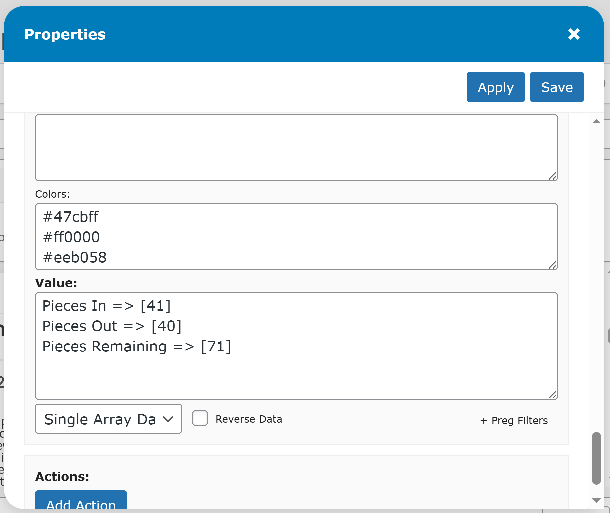
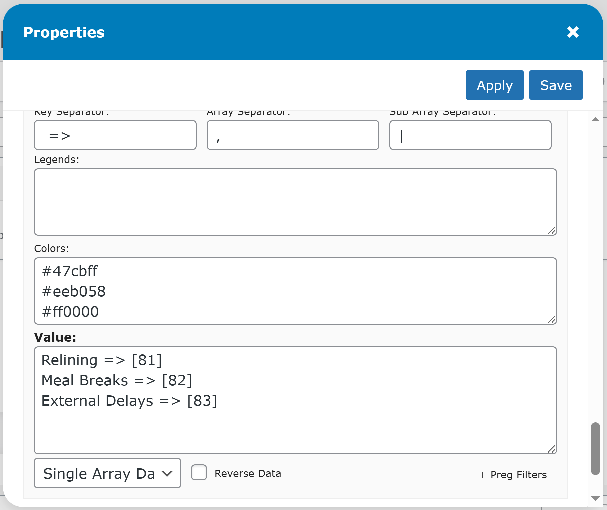
I have successfully recreated the graphs in E2PDF, but the only issue I have is that the I cannot assign a specific colour to a dataset, instead it seems to select the colours based on the first dataset to contain data.

See screensots attached.

Is there a way to tie colour 1 to dataset 1, and so on?

Cheers,

Kal
April 14, 2026 08:50:45
E2Pdf
Topics: 7
Messages: 3637
Support
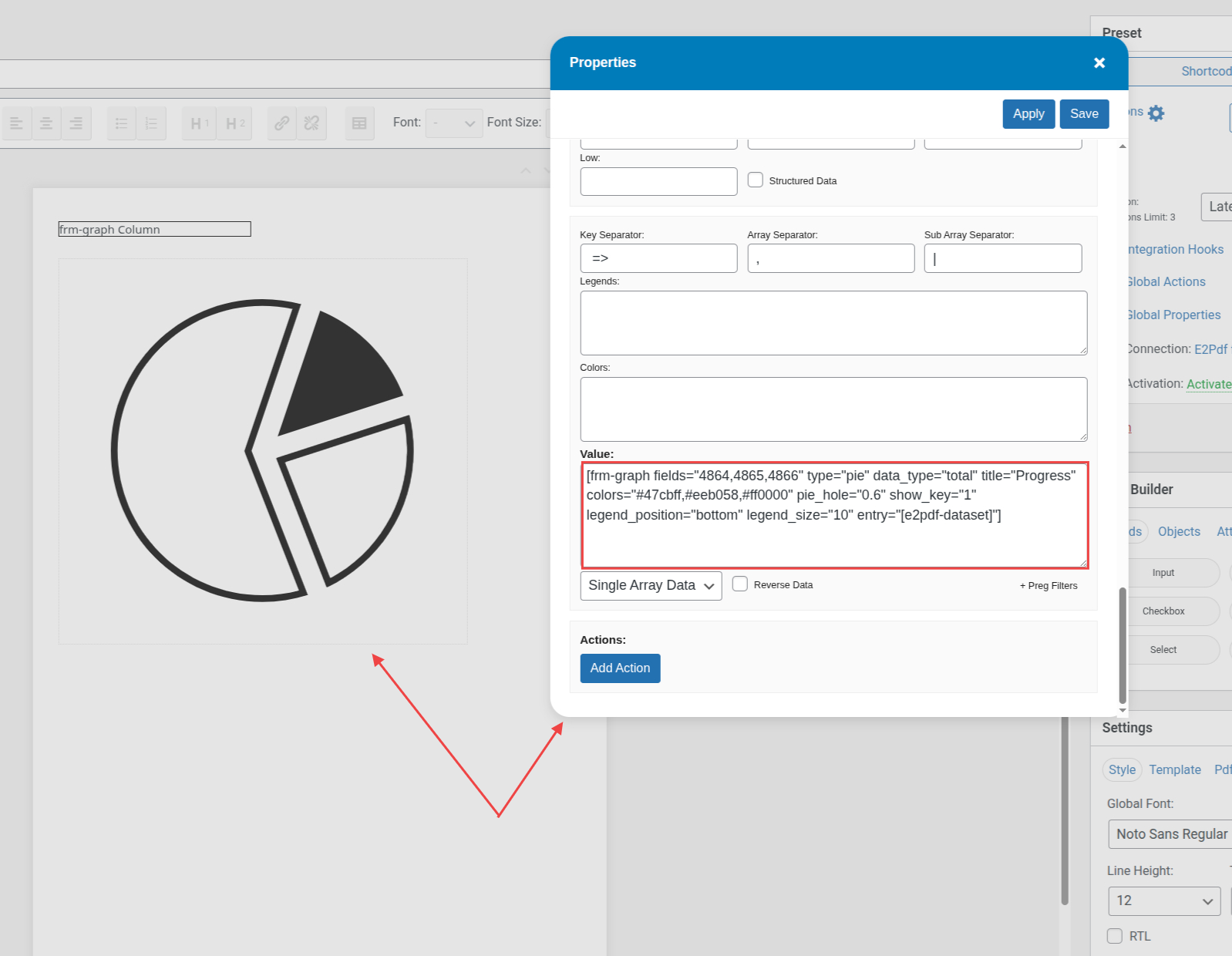
Hello,

Probably the issue is in the value formatting. Could you please try changing it to:

Relining=> [81], Meal Breaks => [82], Extenral Delays => [83]

P.S. Do you need to output data for a specified entry? As by default, the [frm-graph] shortcode outputs global stats.

We would really appreciate your feedback at WordPress.org!
April 14, 2026 11:13:41
E2Pdf
Topics: 7
Messages: 3637
Support
Hello,

We've just released an update to the RC version (1.32.14) that adds support for the [frm-graph] shortcode. Please note that this feature is still in beta, so we would appreciate it if you report any issues you encounter.

To use it, update the plugin to the latest RC version by following the steps here: https://e2pdf.com/docs/install#rc-version

After updating, you should be able to use the [frm-graph] shortcode directly in the Graph Value field. If the graph should be generated for a specific entry, the entry="[e2pdf-dataset]" attribute must be added. Please refer to the attached screenshot for reference.

[frm-graph fields="41,40,71" type="pie" data_type="total" title="Progress" colors="#47cbff,#eeb058,#ff0000" pie_hole="0.6" show_key="1" legend_position="bottom" legend_size="10" entry="[e2pdf-dataset]"]

We would really appreciate your feedback at WordPress.org!
April 15, 2026 09:58:40
kaljade
Topics: 1
Messages: 6
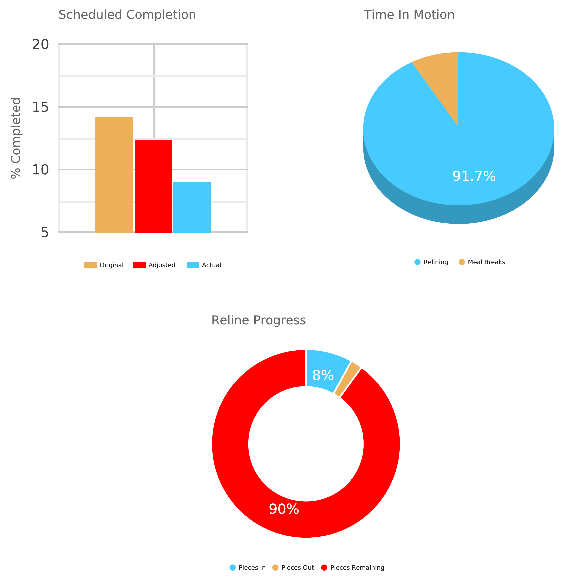
Updated to the new RC version and it works perfectly.

Thank you for the outstanding support!

Cheers,

Kal
September 29, 2026 01:34:42
kaljade
Topics: 1
Messages: 6
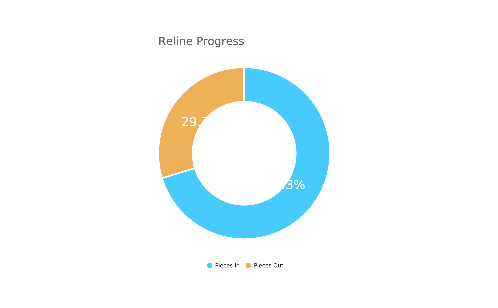
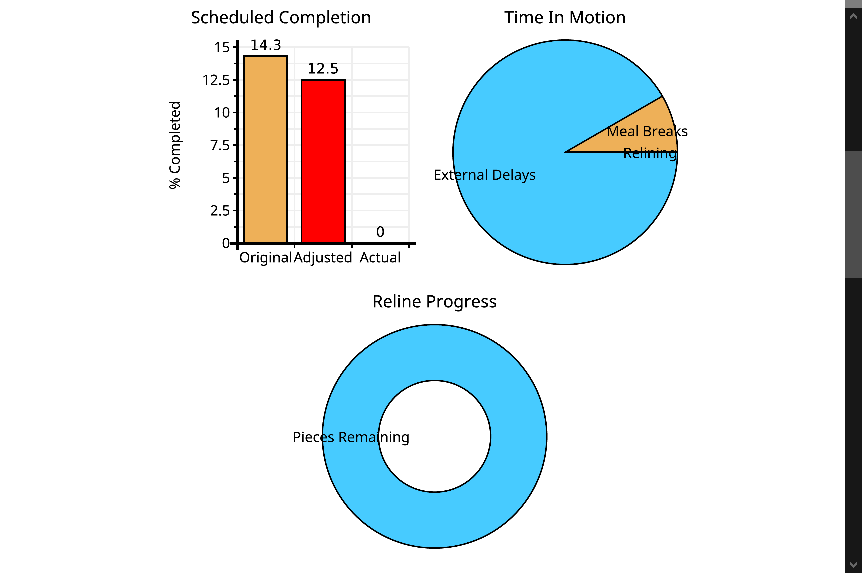
Is there a way to edit the text in the Pie Graph (see screenshot attached)?

I'd like change the text from percentage to label, I believe graphs rely on Google charts HTML5/SVG technology: https://developers.google.com/chart/interactive/docs/gallery/piechart#configuration-options but trying to add the ` pieSliceText="label" ` parameter does not have any impact.

Here's my graph configuration:

```[frm-graph fields="41,40,71" title_size="8" type="pie" data_type="total" title="Reline Progress" colors="#47cbff,#eeb058,#ff0000" pie_hole="0.6" show_key="1" legend_position="bottom" legend_size="4" entry="[e2pdf-dataset]"]```

Any assistance you can offer would be greatly appreciated.

Cheers,

Kal
September 29, 2026 03:05:29
kaljade
Topics: 1
Messages: 6
Sorry I meant value not label, but there's no way to edit posts.

pieSliceText="value" does nothing is what I meant.

Cheers,

Kal
September 29, 2026 07:39:38
E2Pdf
Topics: 7
Messages: 3637
Support
Hello,

As we know, Formidable Forms doesn't support that attribute directly. However, you should be able to add support for it by adding a filter to your theme's functions.php file or by adding it as a PHP snippet:

https://code.e2pdf.com/?9cd01d6a859bf213#Gabhvy6o68rcyYqw4DVzyctAsuPKzZtPf3FwGBYkbXkp

After adding the snippet, you can try using the following attribute in the shortcode: pie_slice_text="value"

[frm-graph fields="41,40,71" title_size="8" type="pie" data_type="total" title="Reline Progress" colors="#47cbff,#eeb058,#ff0000" pie_hole="0.6" show_key="1" legend_position="bottom" legend_size="4" pie_slice_text="value" entry="[e2pdf-dataset]"]


We would really appreciate your feedback at WordPress.org!
September 30, 2026 00:44:19
kaljade
Topics: 1
Messages: 6
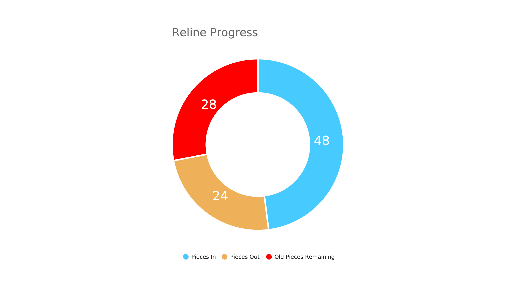
I used WPCode to add the php snippet and then added the pie_slice_text="value" attribute to the shortcode and it worked perfectly (see screenshot).

Thank you for your prompt response and excellent customer service!

Cheers,

Kal
Get News and Updates
Our monthly newsletter keeps you in the loop, so you'll always be up to date with the latest news and updates about E2Pdf.
* You can update your email subscription preferences here.
All trademarks, service marks, trade names, product names, and logos appearing on this website are the property of their respective owners. The use of trademarks such as Formidable Forms®, Forminator Forms®, Gravity Forms®, JetFormBuilder®, WordPress®, WooCommerce®, WPForms® and others is solely for identification purposes (nominative use) and does not imply any affiliation, sponsorship, or endorsement by the respective trademark holders.
© 2017 - 2026, https://e2pdf.com

We use cookies to collect and analyse information on site performance and usage, to provide social media features and to enhance and customise content and advertisements. By clicking "Accept Selected", you consent to use of selected cookies according to our Cookie Policy.