Radio Buttons and Checkboxes

August 30, 2018 19:22:23
Lynn
Topics: 1
Messages: 8
What is the proper way to map radio buttons or checkboxes to a Formidable form?
August 30, 2018 19:24:12
Lynn
Topics: 1
Messages: 8
I have been unsuccessful in mapping my formidable form check boxes to my E2PDF form. Can you explain how it is done?
August 30, 2018 19:56:23
E2Pdf
Topics: 7
Messages: 3617
Support
Hi.

The easiest way is: "Right" mouse click on "checkbox", "radio" -> "Map Field" and choose needed field.

Another is manual mapping: You can check out our F.A.Q or view some example videos on YouTube.

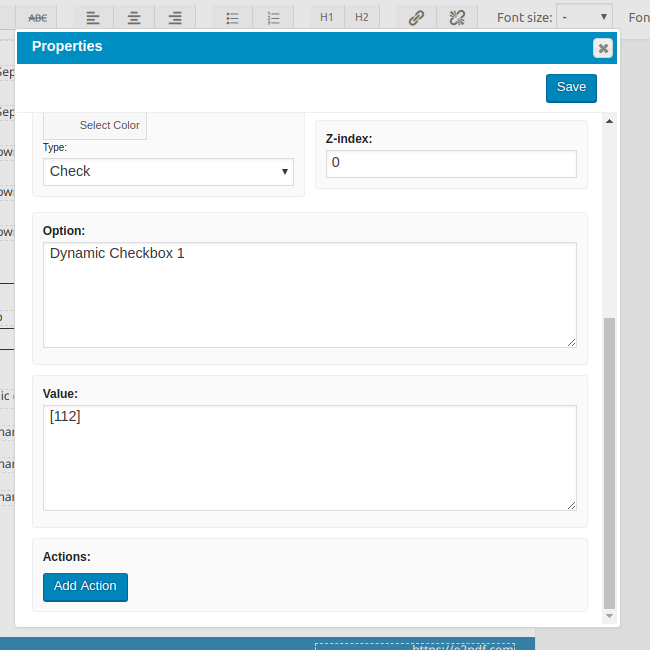
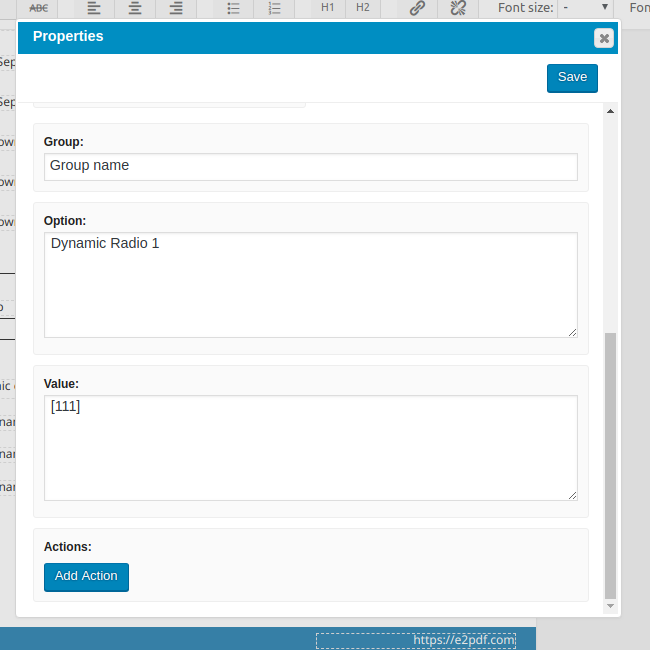
I've attached some images with correct mapping of checkbox and radio button types, maybe like this will be more clear.

We remain at your service.


We would really appreciate your feedback at WordPress.org!
September 12, 2018 17:08:12
Lynn
Topics: 1
Messages: 8
I'm still having a problem mapping my check boxes. I've mapped them as you suggested. The check boxes can be saved in Formidable Forms but the information doesn't seem to transfer to my PDF.
September 12, 2018 18:05:02
E2Pdf
Topics: 7
Messages: 3617
Support
Hi,

Something wrong. Are you able to give us access so we can take a look? If yes, complete please this form.

I see in the attached PDF "radio" boxes, but it seems they have different group. For more information it's need to take a look on the form and example data.

We remain at your service.

We would really appreciate your feedback at WordPress.org!
September 12, 2018 21:42:45
PRO2PDF
Topics: 2
Messages: 69
Support
The login credentials you provided are not valid, please check the credentials and resubmit this form.

We remain at your service.

We would really appreciate your feedback at WordPress.org!
September 12, 2018 23:15:14
PRO2PDF
Topics: 2
Messages: 69
Support
There appears to be a bug when using commas within the option value. We changed the commas "," to dashes "-" as a temporary work-around as we fix the issue on our side.

We remain at your service.

We would really appreciate your feedback at WordPress.org!
September 13, 2018 06:56:44
E2Pdf
Topics: 7
Messages: 3617
Support
We've just released an update (1.00.08) which must solve issue with containing commas inside "checkbox" option value.

Lest us know please if you will face any other issues with checkbox mapping. Thank you.

We remain at your service.

We would really appreciate your feedback at WordPress.org!
September 13, 2018 16:22:21
Lynn
Topics: 1
Messages: 8
Thank you, it works great!
Get News and Updates
Our monthly newsletter keeps you in the loop, so you'll always be up to date with the latest news and updates about E2Pdf.
* You can update your email subscription preferences here.
All trademarks, service marks, trade names, product names, and logos appearing on this website are the property of their respective owners. The use of trademarks such as Formidable Forms®, Forminator Forms®, Gravity Forms®, JetFormBuilder®, WordPress®, WooCommerce®, WPForms® and others is solely for identification purposes (nominative use) and does not imply any affiliation, sponsorship, or endorsement by the respective trademark holders.
© 2017 - 2026, https://e2pdf.com

We use cookies to collect and analyse information on site performance and usage, to provide social media features and to enhance and customise content and advertisements. By clicking "Accept Selected", you consent to use of selected cookies according to our Cookie Policy.