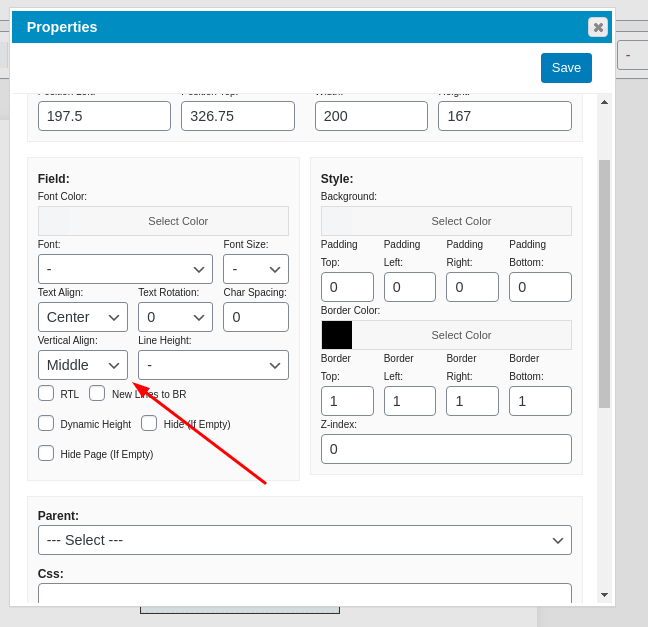
centre text vertically and horizontally and pdf live preview

Caldera Forms Under Review
April 28, 2020 14:17:31
melpoole
Topics: 1
Messages: 2
Hi E2PDF,

I am a non-techie, can't code and have just made my first website. You're plugin is fab but I was hoping you could help me as I can't work out how to do a couple of things:

1. I am using E2PDF to create a thank you letter from a nomination form made using Caldera. I understand that you can't have a text box that re-sizes so I have created a text box in my E2PDF template for the maximum space available and I have mapped this to the thank you message field in my caldera form. However, sometimes these messages are a short one line message and other times they are a very long paragraph or two. If I use the formatting options to select centre, this centres all the text in the middle at the top only. I would like the message text/paragraphs to be justified not centred, but then to be positioned centrally in the text box both vertical and horizontally. Can I add css or html code in the format box to make this happen?? If so could you tell me what I need to input as I can't code and have tried googling but can't work it out.

2. I would also like the to display a preview of the E2PDF letter that will be produced from the caldera form so the person completing the form can double check how it appears and either complete the submission or go back and edit their entries. Is this possible? Could you explain how I do it if so?

Many thanks,

Mel P
April 28, 2020 16:13:32
E2Pdf
Topics: 7
Messages: 3614
Support
Hi,

1. We have this feature already in "Feature Request" section (https://e2pdf.com/support/desk/text-vertical-center and it's included in our roadmap but unfortunately it's not yet released. As soon as this functionality will be available we will update this thread.

2. E2Pdf can work only with saved submitted data, so in theory process must look like this:

User Submit Data -> See PDF -> Can return and edit own submitted entry to re-submit data

Caldera forms has "Connected Forms" which can be something similar what you need to do, but after fast review it looks like it will be need to use some custom hooks with PHP coding to accomplish this task and modify output to show PDF with correctly entry set after first form submitted, as E2Pdf can't generate it in this way automatically.

We remain at your service.

We would really appreciate your feedback at WordPress.org!
April 30, 2020 19:02:13
melpoole
Topics: 1
Messages: 2
Thanks for the speedy reply.
May 14, 2020 15:09:40
E2Pdf
Topics: 7
Messages: 3614
Support
Hi,

We just released an update (1.11.00) with support of vertical alignment for "html" object, so if it's acceptable for you, you can use it instead of "textarea" field until this option will be extended to "textarea" also.

We remain at your service.

We would really appreciate your feedback at WordPress.org!
Get News and Updates
Our monthly newsletter keeps you in the loop, so you'll always be up to date with the latest news and updates about E2Pdf.
* You can update your email subscription preferences here.
All trademarks, service marks, trade names, product names, and logos appearing on this website are the property of their respective owners. The use of trademarks such as Formidable Forms®, Forminator Forms®, Gravity Forms®, JetFormBuilder®, WordPress®, WooCommerce®, WPForms® and others is solely for identification purposes (nominative use) and does not imply any affiliation, sponsorship, or endorsement by the respective trademark holders.
© 2017 - 2026, https://e2pdf.com

We use cookies to collect and analyse information on site performance and usage, to provide social media features and to enhance and customise content and advertisements. By clicking "Accept Selected", you consent to use of selected cookies according to our Cookie Policy.