How to combine two shortcodes

Formidable Forms
June 22, 2023 03:01:42
aengine
Topics: 1
Messages: 4
Hello

I have some data that is comma separated that I need to display in a column. I am currently using this shortcode that works.

[e2pdf-format-output search="," ireplace="<br>"][326][/e2pdf-format-output]

In addition to this I also need to format the data. I am using this shortcode with success in the other columns.

R [e2pdf-format-number explode="," decimal='2' thousands_sep=","][363][/e2pdf-format-number]

How do I combine both of these into a single statement?

Thank you in advance.

Kind regards
Lawrence
June 22, 2023 03:11:04
E2Pdf
Topics: 7
Messages: 3614
Support
Hi,

Is it correct that each comma-separated value from [326] must be a formatted number? If yes, try to use this shortcode:

[e2pdf-format-number explode="," decimal='2' thousands_sep="," implode="<br>"][326][/e2pdf-format-number]

We would really appreciate your feedback at WordPress.org!
June 22, 2023 03:37:44
aengine
Topics: 1
Messages: 4
Thank you for the quick response. What you have stated is correct. I replaced the following as a test:

Monthly Payment
Was: [e2pdf-format-output search="," ireplace="<br>"][363][/e2pdf-format-output]
Now: [e2pdf-format-number explode="," decimal='2' thousands_sep="," implode="<br>"][363][/e2pdf-format-number]

Interest Amount
Was: [e2pdf-format-output search="," ireplace="<br>"][364][/e2pdf-format-output]
Now: [e2pdf-format-number explode="," decimal='2' thousands_sep="," implode="<br>"][364][/e2pdf-format-number]

The comma separated values are being put on a new line as required but the first value is now 0.00.

I've attached some references.

Also, I need to add an R before the numbers for the currency.
June 22, 2023 03:52:14
E2Pdf
Topics: 7
Messages: 3614
Support
Strange, we can't replicate the issue on our side.

Can you please create a "textarea" inside E2Pdf Template and map it with the shortcode [364]. After this export PDF and attach the screenshot where we can see the original output in it?

Is [364] an "input" field? Or it's some other type used?

We would really appreciate your feedback at WordPress.org!
June 22, 2023 04:25:10
aengine
Topics: 1
Messages: 4
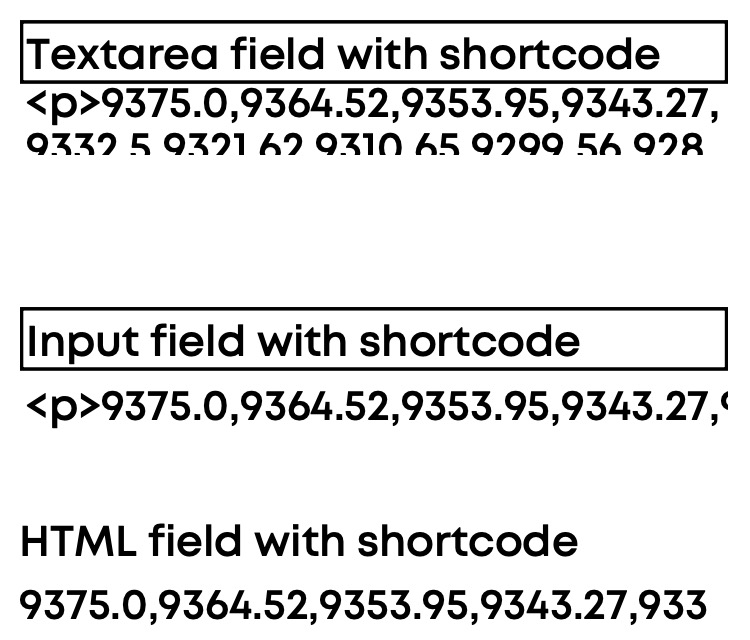
I am using HTML fields.

The issue was that there was a <p> tag included that originated from how field in Formidable Forms.

I have attached a screenshot for future reference.

Last requirement is that I need to add a R in front of each number to denote the currency.
June 22, 2023 04:35:35
E2Pdf
Topics: 7
Messages: 3614
Support
The final shortcode will be:

R[e2pdf-format-number explode="," decimal='2' thousands_sep="," implode="<br>R"][364 wpautop=0][/e2pdf-format-number]

If you can have the field completely empty, then you can add a "Hide" action to hide first "R".

We would really appreciate your feedback at WordPress.org!
Get News and Updates
Our monthly newsletter keeps you in the loop, so you'll always be up to date with the latest news and updates about E2Pdf.
* You can update your email subscription preferences here.
All trademarks, service marks, trade names, product names, and logos appearing on this website are the property of their respective owners. The use of trademarks such as Formidable Forms®, Forminator Forms®, Gravity Forms®, JetFormBuilder®, WordPress®, WooCommerce®, WPForms® and others is solely for identification purposes (nominative use) and does not imply any affiliation, sponsorship, or endorsement by the respective trademark holders.
© 2017 - 2026, https://e2pdf.com

We use cookies to collect and analyse information on site performance and usage, to provide social media features and to enhance and customise content and advertisements. By clicking "Accept Selected", you consent to use of selected cookies according to our Cookie Policy.