How to display the download link of a document in gravityView.

Gravity Forms
August 19, 2019 05:04:45
wakadala
Topics: 8
Messages: 20
Hi Support,

I have 13 forms each with a different PDF template, and I want when someone opens a list of entries for any of the forms, they can download a corresponding PDF file like in the attached image. In the attached image, I decided to use GravityPDF because they can the option for GravityView, but then they lack the option to autofill the entry data into already existing PDFs so I purchased e2PDF and would like to purchase the 40 template package to accommodate all my forms but then I need to be sure I can allow download of this filled PDF via GravityView which I'm predominantly using to display over 60 tables of data on the frontend for logged in Users. Please let me know how I can do that. Thank you!

Philip.
August 19, 2019 06:33:33
E2Pdf
Topics: 7
Messages: 3614
Support
Hi,

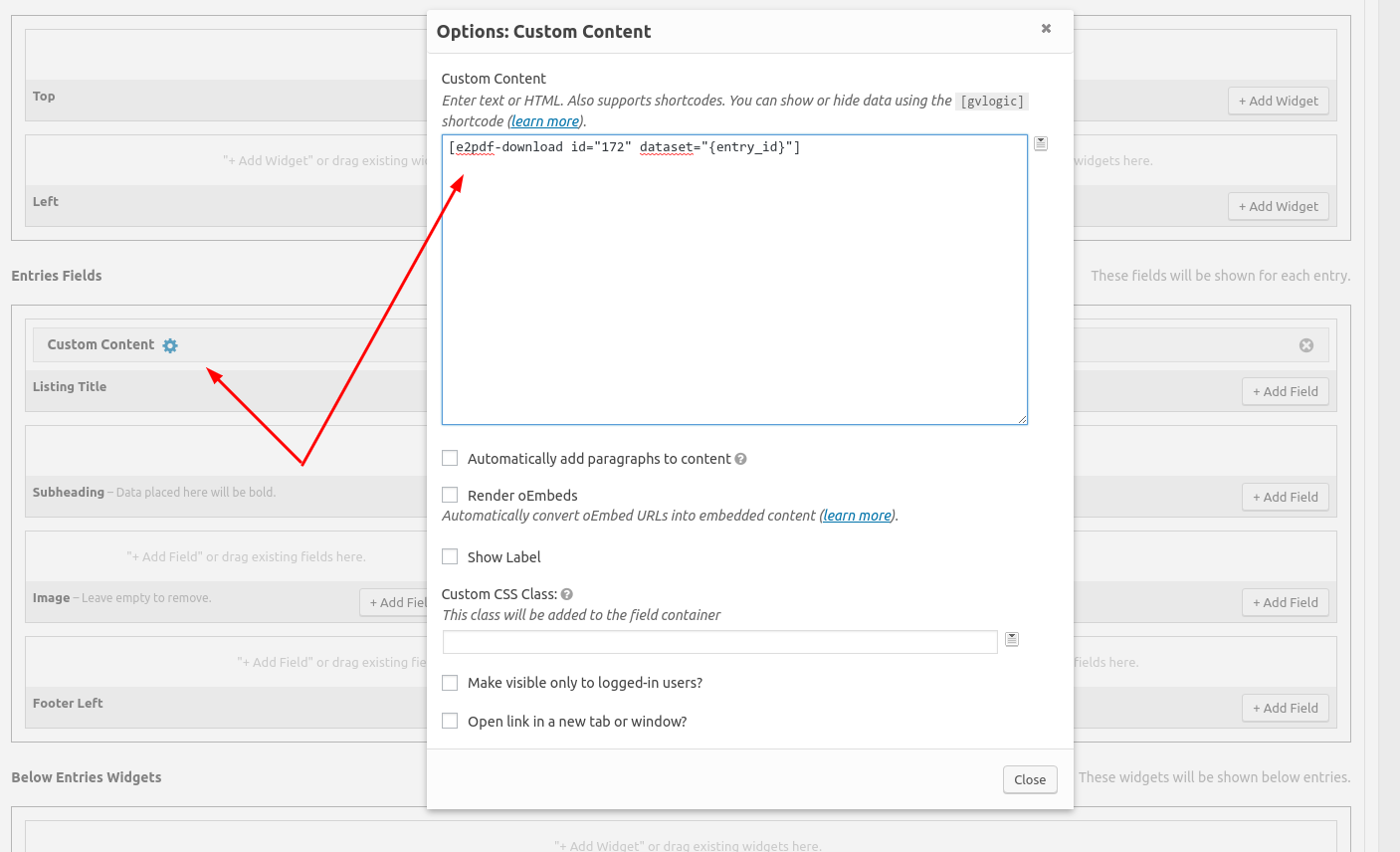
E2Pdf support GravityView while using shortcodes inside "Custom Content". It must be defined dataset via GravityView and the example shortcode must look like: [e2pdf-download id="172" dataset="{entry_id}"] (screenshot attached).

Let us know please if you will face any issues implementing the solution. Thank you.

We remain at your service.

We would really appreciate your feedback at WordPress.org!
September 11, 2019 20:51:08
wakadala
Topics: 8
Messages: 20
Hi, this was so great. I never get a chance some times to say thanks, but your support is the best I've ever had online so far. Thanks so much!!
September 11, 2019 20:51:35
wakadala
Topics: 8
Messages: 20
Please mark this as "Perfectly resolved".
September 12, 2019 05:17:23
E2Pdf
Topics: 7
Messages: 3614
Support
Thank you!

We remain at your service.

We would really appreciate your feedback at WordPress.org!
Get News and Updates
Our monthly newsletter keeps you in the loop, so you'll always be up to date with the latest news and updates about E2Pdf.
* You can update your email subscription preferences here.
All trademarks, service marks, trade names, product names, and logos appearing on this website are the property of their respective owners. The use of trademarks such as Formidable Forms®, Forminator Forms®, Gravity Forms®, JetFormBuilder®, WordPress®, WooCommerce®, WPForms® and others is solely for identification purposes (nominative use) and does not imply any affiliation, sponsorship, or endorsement by the respective trademark holders.
© 2017 - 2026, https://e2pdf.com

We use cookies to collect and analyse information on site performance and usage, to provide social media features and to enhance and customise content and advertisements. By clicking "Accept Selected", you consent to use of selected cookies according to our Cookie Policy.