NumberFormatException: For input string

Bug Released
March 04, 2021 14:42:42
Aduque
Topics: 3
Messages: 10
Hello,

When I finish my form and send the email I have two main errors:

1) The first one is that the attachment is not attached to the email, even when the correct shortcode is written.
The Template is active
The form is correctly connected to the template.

2) The second one is that the download link, when clicked generates a new page with this error:
NumberFormatException: For input string: ""

How could I solve this?

Thank you very much in advance.
March 04, 2021 14:46:38
Aduque
Topics: 3
Messages: 10
See screenshot.

Thank you!
March 04, 2021 14:57:13
E2Pdf
Topics: 7
Messages: 3614
Support
Hi,

It's one issue as PDF can't be generated that's why you didn't get attachments.

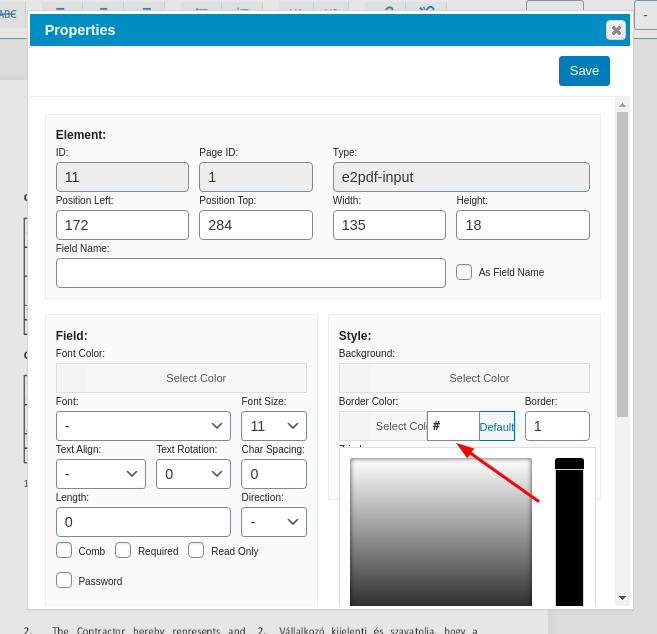
If it's failing under preview It could be "broken" html inside HTML field. If you copied from some webpage it copies all HTML with styles which can cause such issue because it can contain classes and styles which doesn't supported by E2Pdf. You can see the source via "Right Mouse Click" -> "Properties" -> "Value" under "HTML" block and we recommend to copy it to "Value" via "Properties" if needed and make any styles manually. Broken "HTML" (screenshot 1).

We are contentiously fixing our engine to ignore not supported tags and styles as all HTML must be converted to PDF format, however sometimes it can happen.

If you will not be able to find an issue, attach please backup of E2Pdf Template (screenshot 2).

We would really appreciate your feedback at WordPress.org!
March 04, 2021 15:01:32
Aduque
Topics: 3
Messages: 10
Hello,

Thank you for your answer.

Please find attached the backup!
March 04, 2021 15:21:28
E2Pdf
Topics: 7
Messages: 3614
Support
You have incorrect color set under "border" on some fields. Keep attention that some fields located under another fields. So you can just remove all current fields and remap or fix the "color" value.

P.S. We marked it as "bug" and will include validation fix on nearest update.

We remain at your service.

We would really appreciate your feedback at WordPress.org!
March 04, 2021 15:22:44
Aduque
Topics: 3
Messages: 10
THANK YOU VERY MUCH!!
March 10, 2021 10:27:25
Aduque
Topics: 3
Messages: 10
Hello,

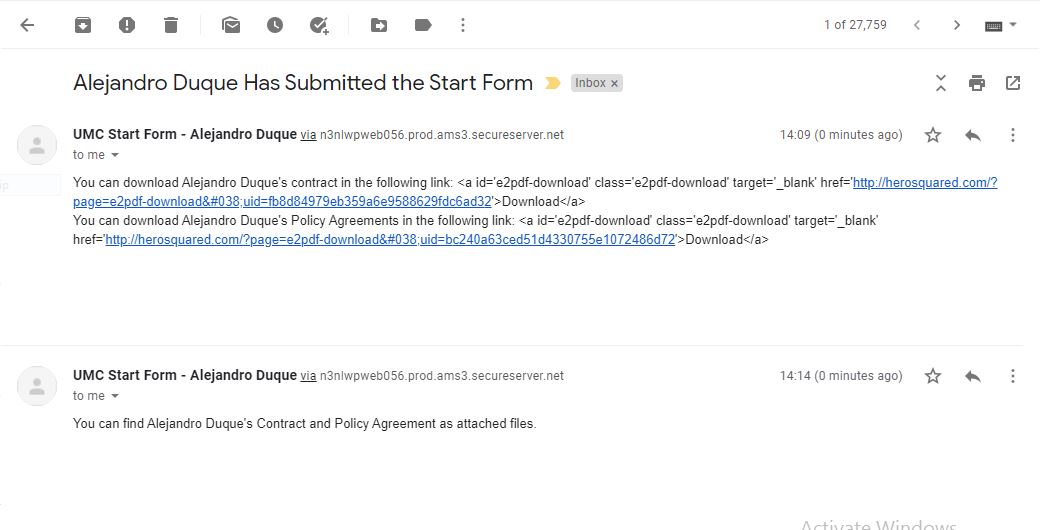
I'm encountering another problem when receiving the download links in my email. Please see the picture attached.

I also attach the backup of the two forms I'm trying to show in the email. Neither the shortcodes appear correct and when trying attachments, they don't attach.

Thank you in advance for your kind help.
March 10, 2021 10:33:25
E2Pdf
Topics: 7
Messages: 3614
Support
Hi,

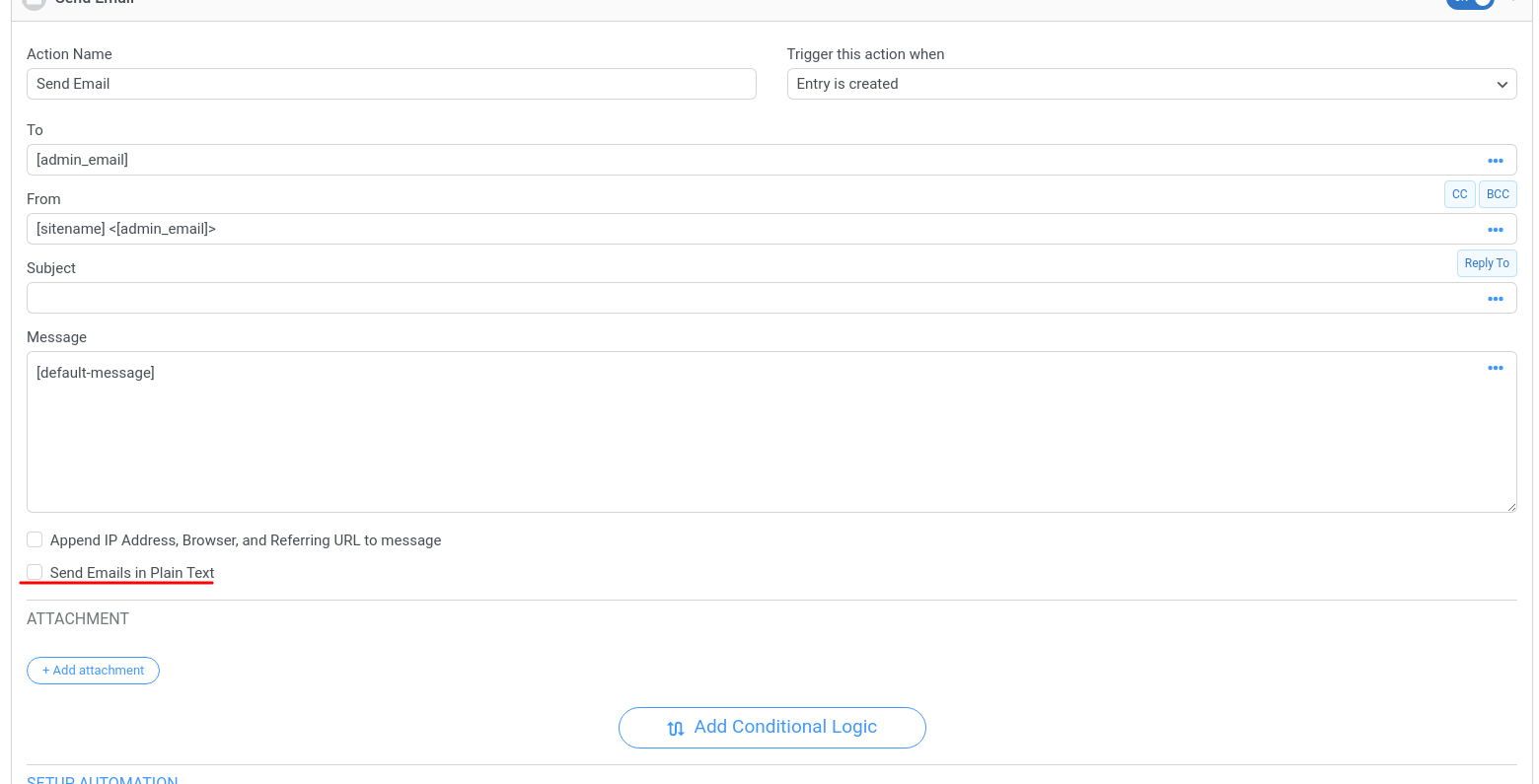
It's not connected with E2Pdf Template structure. Check please if you do NOT have set to send emails with "plain" text under Formidable Forms. (screenshot attached).

If you do NOT have checkbox on and you are using some 3rd party plugin to send emails, try to deactivate it temporary or check its settings, some plugins can have option to convert all emails to "plain" text.

We remain at your service.

We would really appreciate your feedback at WordPress.org!
Get News and Updates
Our monthly newsletter keeps you in the loop, so you'll always be up to date with the latest news and updates about E2Pdf.
* You can update your email subscription preferences here.
All trademarks, service marks, trade names, product names, and logos appearing on this website are the property of their respective owners. The use of trademarks such as Formidable Forms®, Forminator Forms®, Gravity Forms®, JetFormBuilder®, WordPress®, WooCommerce®, WPForms® and others is solely for identification purposes (nominative use) and does not imply any affiliation, sponsorship, or endorsement by the respective trademark holders.
© 2017 - 2026, https://e2pdf.com

We use cookies to collect and analyse information on site performance and usage, to provide social media features and to enhance and customise content and advertisements. By clicking "Accept Selected", you consent to use of selected cookies according to our Cookie Policy.