pdf output in a nested form

Gravity Forms
December 17, 2021 08:15:08
gruptemple
Topics: 8
Messages: 19
Hi team,

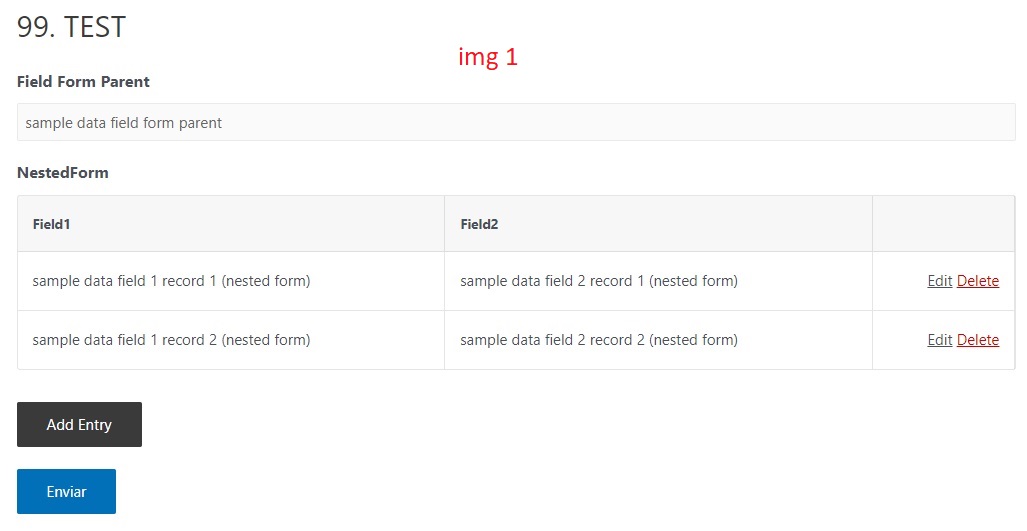
I have 2 forms, one main and one nested. (Img 1)

As you can see in the images, the inputs of the nested form are displayed correctly: 2 columns containing 2 fields and there are 2 records. (img 1)
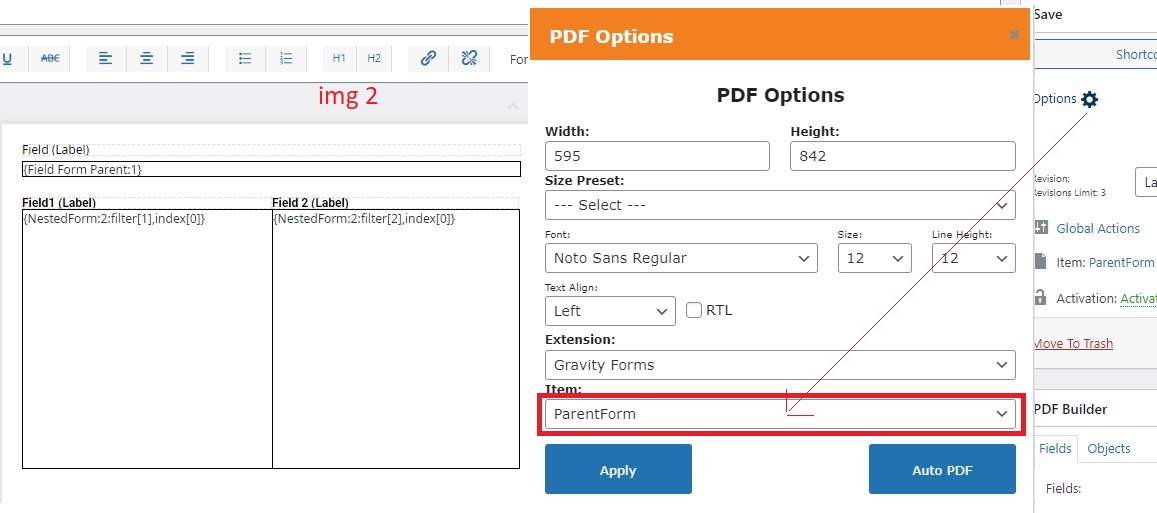
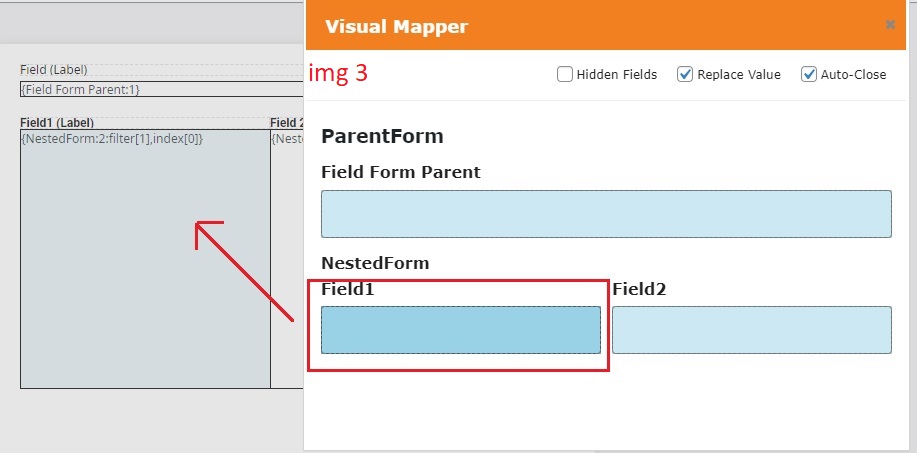
The pdf template is correctly linked to the main form and the mapped fields (img 2 and img 3)
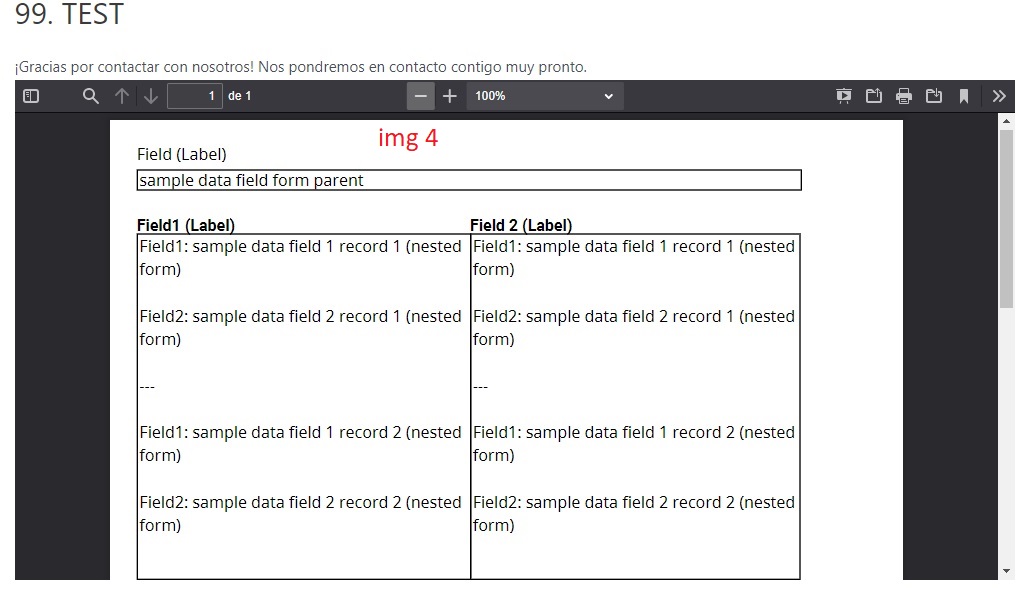
Once the form is submitted, the resulting pdf shows all the records together for each mapped field (img 4)
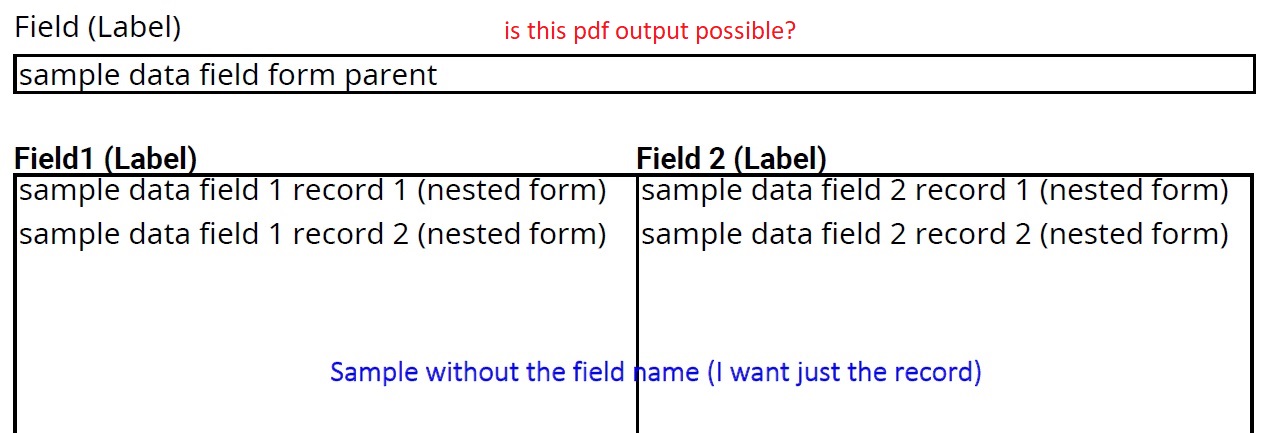
I thought that the result would be as it appears in the frontend of the nested form (img1), expecting a pdf result like the one shown in img 5.
It's possible?

I have tried all possible combinations:
{NestedForm: 2: filter [1], index [0]}
{NestedForm: 2: filter [2], index [0]}
{NestedForm: 2: filter [1], index [1]}
{NestedForm: 2: filter [2], index [2]}

And the result is always the same (img 4)

I hope I have explained this situation well.

Thanks a lot.
December 17, 2021 10:58:08
E2Pdf
Topics: 7
Messages: 3614
Support
Hi,

Unfortunately we can't replicate issue on our side. It must output information exactly as on img 5.

Can you let us know please which version of plugins do you have:
- Gravity Forms
- GP Nested Forms
- Gravity Forms All Fields Template

Also which type of fields is it used under "Nested" form, is it simple "Single Line Text" fields?

We would really appreciate your feedback at WordPress.org!
December 18, 2021 05:59:29
gruptemple
Topics: 8
Messages: 19
Hi,
Sorry for not giving more information

These are the versions:

- Gravity Forms: 2.5.15.3
- GP Nested Forms: 1.0-rc-1.2
- Gravity Forms All Fields Template :I do not know. The one that comes by default. How do I know where this is?

Also which type of fields is it used under "Nested" form, is it simple "Single Line Text" fields? YES

If you need anything else, I am at your disposal.

Thanks a lot

December 18, 2021 06:16:52
E2Pdf
Topics: 7
Messages: 3614
Support
Hi,

Gravity Forms All Fields Template is separate plugin which must be installed along with "Nested Forms" to have correct support of "index" modifiers (Screenshot). So it seems the issue.

Can you please download attached "gw-all-fields-template.zip" plugin, install and check if issue will be resolved.

We remain at your service.

We would really appreciate your feedback at WordPress.org!
December 18, 2021 11:07:10
gruptemple
Topics: 8
Messages: 19
Hi team,

Installing this plugin has fixed the problem.

Thanks a lot!
Get News and Updates
Our monthly newsletter keeps you in the loop, so you'll always be up to date with the latest news and updates about E2Pdf.
* You can update your email subscription preferences here.
All trademarks, service marks, trade names, product names, and logos appearing on this website are the property of their respective owners. The use of trademarks such as Formidable Forms®, Forminator Forms®, Gravity Forms®, JetFormBuilder®, WordPress®, WooCommerce®, WPForms® and others is solely for identification purposes (nominative use) and does not imply any affiliation, sponsorship, or endorsement by the respective trademark holders.
© 2017 - 2026, https://e2pdf.com

We use cookies to collect and analyse information on site performance and usage, to provide social media features and to enhance and customise content and advertisements. By clicking "Accept Selected", you consent to use of selected cookies according to our Cookie Policy.