Shortcode to ACF Advanced Views?

WordPress
January 10, 2024 06:35:17
PeterPDF
Topics: 1
Messages: 3
Is it possible to reference a shortcode from another plugin?

Background - I use Advanced Views Lite plugin to display a big list of ACF fields. The plugin gives me a shortcode to that list.

Can I reference that shortcode to include in the generated PDF?

Thanks for pointing me the right way!
January 10, 2024 07:13:52
E2Pdf
Topics: 7
Messages: 3614
Support
Hello,

E2Pdf supports 3rd party shortcodes, however, it also depends on the designed shortcode that will be used as sometimes shortcodes try to access data that is not available in the PDF context. You can just try to use it with the "FREE" version of E2Pdf to see if it will be rendered correctly.

We would really appreciate your feedback at WordPress.org!
February 06, 2024 07:59:05
PeterPDF
Topics: 1
Messages: 3
Hmmm- Sorry - I'm still struggling. (it's me!)

I'm using ACF and ACF Advanced Views. That gives me a shortcode of ...
[acf_views name="ACF mics view" view-id="6542552b68180"]
(the shortcode works fine in other areas of the website)

If I put that shortcode into a template textfield......nothing shows when the PDF is created. Just blank.

Any advice is gratefully welcomed. Thanks
February 06, 2024 08:27:58
E2Pdf
Topics: 7
Messages: 3614
Support
Hello,

Can you please try to modify the shortcode to:

[acf_views name="ACF mics view" view-id="6542552b68180" object-id="[id]"]

or

[acf_views name="ACF mics view" view-id="6542552b68180" object-id="[e2pdf-dataset]"]

If it still doesn't work, please let us know the connection of your E2Pdf Template and if acf_views must get data from the same post for which you are generating the PDF.

We would really appreciate your feedback at WordPress.org!
February 07, 2024 01:23:23
PeterPDF
Topics: 1
Messages: 3
great - thank you. With [acf_views name="ACF mics view" view-id="6542552b68180" object-id="[e2pdf-dataset]"] it's almost there.

I now safely get the data from the acf_views....
but it renders in the PDF as

"<div class="acf-view acf-view--id--6542552b68180 acf- view--object-id--1091"><div class="acf- view__transducer-type"><div class="acf- view__transducer-type-label">Transducer Type text</div><div class="acf-view__transducer-type- field">Dynamic</div></div><div class="acf- view__frequency-response"><div class="acf- view__frequency-response-label">FR</div><div class="acf-view__frequency-response-field">50 Hz - 12 KHz</div></div><div class="acf-view__polar- pattern">Super cardioid</div>"

So the data I need is in there but how to get it to only render the field data (eg "Dynamic / 50 Hz -12 KHz / Super cardioid)

My E2Pdf template is connected to my Products - Woocommerce.
Yes - acf_views gets the data from the same post for which I'm generating the PDF.

Sorry if I'm dumb! Thank you!
February 07, 2024 02:04:59
E2Pdf
Topics: 7
Messages: 3614
Support
Currently, we can see 2 possible solutions:

1. If you have PHP knowledge - modify the output via PHP filter. Parse the value and modify the output as you need. If it's okay for you, let us know please so we can provide you with a basic hook on how values can be modified.

or

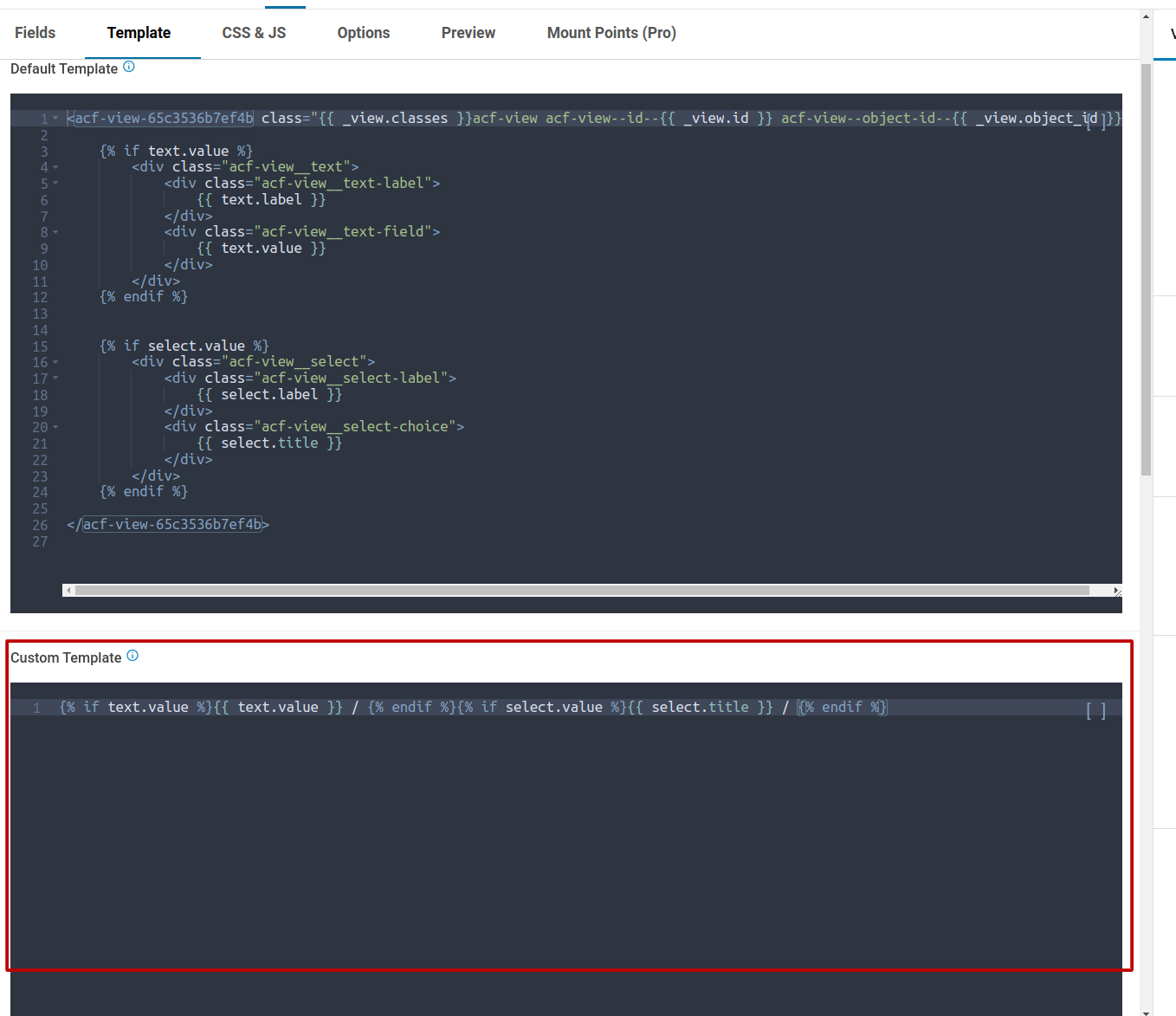
2. Modify the ACF View output template. As we understand it must be possible. You can just try to clone it and modify it to output on your needs. See please the screenshot attached.

We would really appreciate your feedback at WordPress.org!
Get News and Updates
Our monthly newsletter keeps you in the loop, so you'll always be up to date with the latest news and updates about E2Pdf.
* You can update your email subscription preferences here.
All trademarks, service marks, trade names, product names, and logos appearing on this website are the property of their respective owners. The use of trademarks such as Formidable Forms®, Forminator Forms®, Gravity Forms®, JetFormBuilder®, WordPress®, WooCommerce®, WPForms® and others is solely for identification purposes (nominative use) and does not imply any affiliation, sponsorship, or endorsement by the respective trademark holders.
© 2017 - 2026, https://e2pdf.com

We use cookies to collect and analyse information on site performance and usage, to provide social media features and to enhance and customise content and advertisements. By clicking "Accept Selected", you consent to use of selected cookies according to our Cookie Policy.