1. strip_tags filter removing all tags, including "img" tags.
2. textarea doesn't support images to be inserted.
You can try to use following solution:
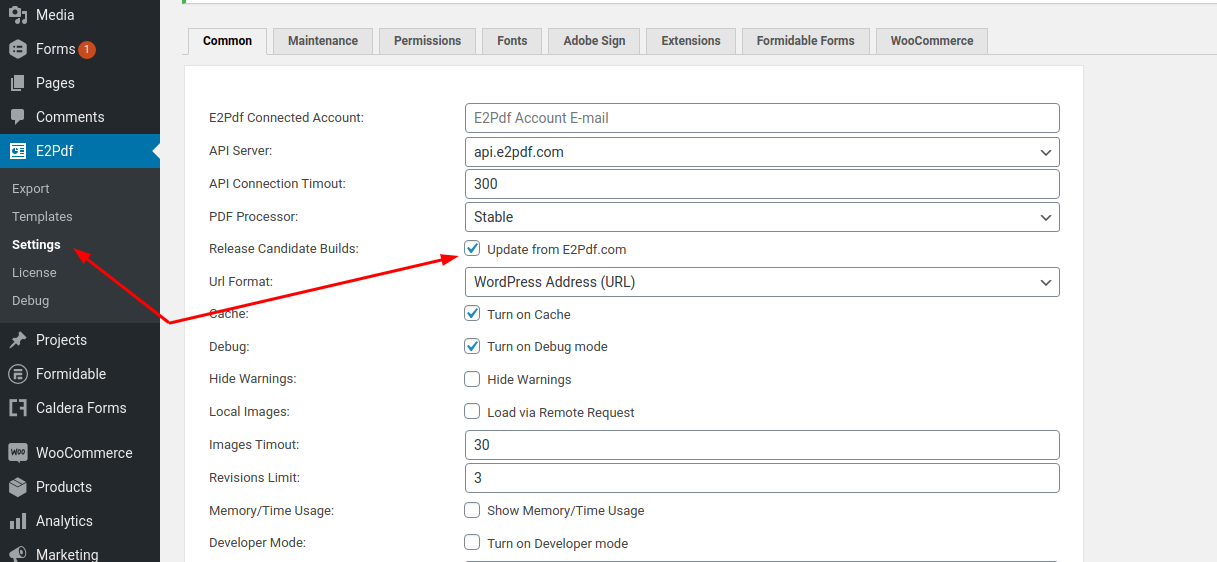
1. Update plugin to RC Version (1.15.11) which has "strip_tags_allowed" attribute support. You can apply update now by turning on updates from "e2pdf.com". Option can be enabled at "E2Pdf" -> "Settings" -> "Release Candidate Builds" (screenshot 1). After enabling this option you must be able to check for updates at "Dashboard" -> "Updates" and update plugin as usual to version 1.15.11.
It's recommended to turn off this option after update
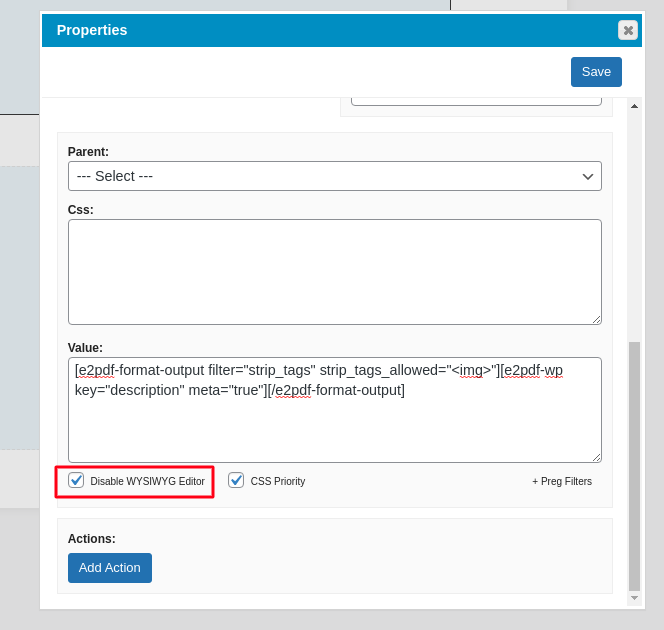
2. Replace "textarea" with "html" object. Set "Disable WYSIWYG Editor" checkbox "on" and use value:
P.S. You must keep in mind please that currently it can be issues with rendering images along with text as wrapping "text" over images is not yet supported.
We use cookies to collect and analyse information on site performance and usage, to provide social media features and to enhance and customise content and advertisements. By clicking "Accept Selected", you consent to use of selected cookies according our to our Cookie Policy.