using formidable and e2pdf

February 20, 2019 16:43:13
netlover
Topics: 28
Messages: 52
Hi,
I'm going to standardize on formidable for all the forms instead of forminator. Just to make sure, for onsubmit, do I choose message? Also then do I just put the list of shotcodes? Can I configure it to immediately open the filled out PDF after submission? If so, how?
February 20, 2019 16:50:57
E2Pdf
Topics: 7
Messages: 3614
Support
Hi,

Yes, you are correct about "Message".

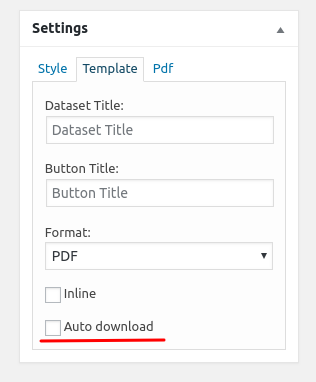
You can set "Auto Download" on "Template" settings or add "auto" attribute to shortcode ([e2pdf-download id="1" auto="true"]) but it will work only if PDF must be saved and not opened in new tab (Not "Inline"). It's due browsers built-in "popup blockers".

Another solution you can use [e2pdf-view id="1"] shortcode to show generated PDF.

We remain at your service.

We would really appreciate your feedback at WordPress.org!
Get News and Updates
Our monthly newsletter keeps you in the loop, so you'll always be up to date with the latest news and updates about E2Pdf.
* You can update your email subscription preferences here.
All trademarks, service marks, trade names, product names, and logos appearing on this website are the property of their respective owners. The use of trademarks such as Formidable Forms®, Forminator Forms®, Gravity Forms®, JetFormBuilder®, WordPress®, WooCommerce®, WPForms® and others is solely for identification purposes (nominative use) and does not imply any affiliation, sponsorship, or endorsement by the respective trademark holders.
© 2017 - 2026, https://e2pdf.com

We use cookies to collect and analyse information on site performance and usage, to provide social media features and to enhance and customise content and advertisements. By clicking "Accept Selected", you consent to use of selected cookies according to our Cookie Policy.