Attachment Shortcodes not working after latest update

Forminator Forms Released
April 14, 2022 10:09:04
tay777
Topics: 2
Messages: 7
After the most recent update a couple of days ago (1.16.46 ), emails no longer attach PDFs like they use to. Only the shortcode is shown.
April 14, 2022 10:09:38
tay777
Topics: 2
Messages: 7
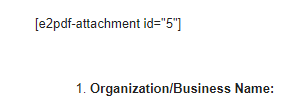
Shortcode shows in an email
April 14, 2022 10:38:33
E2Pdf
Topics: 7
Messages: 3614
Support
Hi,

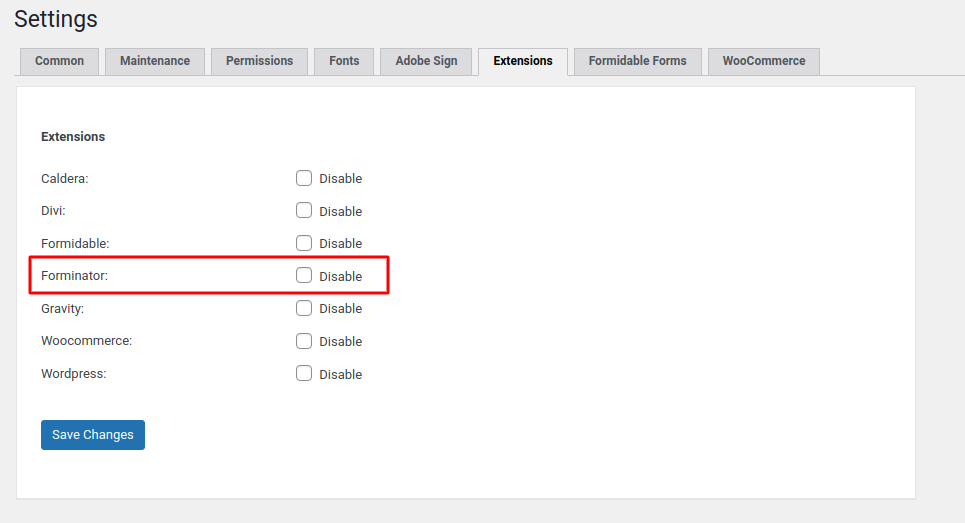
Unfortunately we can't replicate issue on our side and 1.16.46 must not affect shortcodes execution. Can you check please if you didn't disabled "Forminator" extension at "E2Pdf" -> "Settings" -> "Extensions".

It MUST NOT be set checkbox near "Forminator" and it must look like on "Screenshot".

If no "checkbox" set - can you export PDF directly from backend at "E2Pdf" -> "Export"? If yes, unfortunately we need to take a look on installation and if it's acceptable for you submit please support ticket with access details here: https://e2pdf.com/support/request as it can be plugins or addon conflict.

We would really appreciate your feedback at WordPress.org!
April 14, 2022 10:49:56
tay777
Topics: 2
Messages: 7
Your message gave me a better idea of where to look.
In the file e2pdf/classes/extension/e2pdf-forminator.php you have:

if (is_plugin_active('forminator/forminator.php')) {
return true;
}
return false;
}
------------------------------------
I have to change it to:
if (is_plugin_active('forminator Pro/forminator.php')) {
return true;
}
return false;
}
-------------------------------------

Then it starts working
April 14, 2022 11:03:15
tay777
Topics: 2
Messages: 7
To put in context, I had to make this change in the previous version as well. I just forgot I changed it, so when it updated, it erased my change.
April 14, 2022 11:08:21
E2Pdf
Topics: 7
Messages: 3614
Support
Was the plugin renamed or was it installed from some custom source as by default plugin path:

'forminator/forminator.php' and 'forminator-pro/forminator.php'

P.S. Keep in mind please that changes will be truncated on the update however we will check if we can add some custom hook or some possible solution for such cases.

We would really appreciate your feedback at WordPress.org!
April 14, 2022 11:12:14
tay777
Topics: 2
Messages: 7
Correct. They had to make a bug fix and wrote a custom fix before they released it on their official update, so they have gave me a custom plugin install, that I installed via FTP
April 14, 2022 11:18:13
E2Pdf
Topics: 7
Messages: 3614
Support
Ok, thank you for letting us know. We will let you know as soon as we release an update with possibility to use custom path.

We remain at your service.

We would really appreciate your feedback at WordPress.org!
May 23, 2022 06:41:08
E2Pdf
Topics: 7
Messages: 3614
Support
Hi,

In latest versions we added possibility to define 3rd party plugins activation to avoid manually in case if plugin activation can't be detected automatically.

1. You need to use latest versions: 1.16.47 or RC 1.17.32
2. After update just add line to wp-config.php:

define('E2PDF_FORMINATOR_EXTENSION', true);

Let us know please if it will not work as expected.

We remain at your service.

We would really appreciate your feedback at WordPress.org!
Get News and Updates
Our monthly newsletter keeps you in the loop, so you'll always be up to date with the latest news and updates about E2Pdf.
* You can update your email subscription preferences here.
All trademarks, service marks, trade names, product names, and logos appearing on this website are the property of their respective owners. The use of trademarks such as Formidable Forms®, Forminator Forms®, Gravity Forms®, JetFormBuilder®, WordPress®, WooCommerce®, WPForms® and others is solely for identification purposes (nominative use) and does not imply any affiliation, sponsorship, or endorsement by the respective trademark holders.
© 2017 - 2026, https://e2pdf.com

We use cookies to collect and analyse information on site performance and usage, to provide social media features and to enhance and customise content and advertisements. By clicking "Accept Selected", you consent to use of selected cookies according to our Cookie Policy.