Attachment to Formidable Form

December 05, 2018 14:25:05
Topics: 2
Messages: 5
Hello,

I am trying to set up your WordPress plugin with Formidable Forms. I have installed your plugin and created a template. However, i cannot figure out how to get the PDF attachment onto the Formidable Form email notification. I am receiving the emails fine, but with no attachment. I have tried pasting your short code everywhere in the email notification setup, but without success. I'm using this shortcode: [e2pdf-attachment id="1"] Can you tell me where i should be placing this shortcode?

Thank you.
Matt Auman
December 05, 2018 14:44:12
E2Pdf
Topics: 7
Messages: 3614
Support
Hi,

1) Check please if template "Activated". You can find "Activation" status on the right side of E2Pdf Template edit page or on Templates list page.

2) Check please if E2Pdf Template connected to correct extension and form. Menu can be accessed by clicking on "Options" link on Template edit page.

Shortcode must be inserted in the Email body of needed form.

We remain at your service.

We would really appreciate your feedback at WordPress.org!
December 05, 2018 16:23:59
Topics: 2
Messages: 5
That worked. Thanks very much.

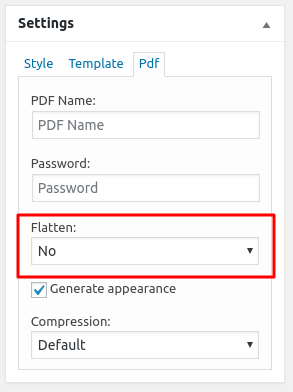
One more question. My PDF is now showing up in the email as a fillable PDF. How do I turn that off so it is a static document?
December 05, 2018 16:32:52
E2Pdf
Topics: 7
Messages: 3614
Support
Just set "Flatten" to "Yes" inside E2Pdf Template PDF Settings.

We remain at your service.

We would really appreciate your feedback at WordPress.org!
December 05, 2018 16:44:52
Topics: 2
Messages: 5
Perfect. Thanks!
December 05, 2018 21:09:29
Topics: 2
Messages: 5
All of your support above worked great. Thank you. I have another issue. I am trying to create a new template by uploading an existing PDF. This worked great with a simple form and i was able to map all the fields by right clicking and using the visual mapper. I am now working on a more involved PDF. When I right click on a field and try to map it, the visual mapper spins for about 15 seconds and then stalls or times out without giving me any fields to select. Can you help?
December 05, 2018 21:25:19
E2Pdf
Topics: 7
Messages: 3614
Support
Unfortunately it seems the error with rendering exact form by Visual Mapper.

If it is possible you can send us access details so we can faster check and understand the issue via Support Request here. If not possible you can try to check error.log and errors which can contain information connected to this issue or try to send us backup of form so we can try to replicate issue. Thank you.

We remain at your service.

We would really appreciate your feedback at WordPress.org!
December 07, 2018 12:10:00
E2Pdf
Topics: 7
Messages: 3614
Support
We just released an update (1.03.00) where were fixed some issues with "Visual Mapper".

If you will still face problem with loading "Visal Mapper" after update, unfortunately we will need to access Formidable Form to find out issue and fix it in future update. Thank you.

We remain at your service.

We would really appreciate your feedback at WordPress.org!
Get News and Updates
Our monthly newsletter keeps you in the loop, so you'll always be up to date with the latest news and updates about E2Pdf.
* You can update your email subscription preferences here.
All trademarks, service marks, trade names, product names, and logos appearing on this website are the property of their respective owners. The use of trademarks such as Formidable Forms®, Forminator Forms®, Gravity Forms®, JetFormBuilder®, WordPress®, WooCommerce®, WPForms® and others is solely for identification purposes (nominative use) and does not imply any affiliation, sponsorship, or endorsement by the respective trademark holders.
© 2017 - 2026, https://e2pdf.com

We use cookies to collect and analyse information on site performance and usage, to provide social media features and to enhance and customise content and advertisements. By clicking "Accept Selected", you consent to use of selected cookies according to our Cookie Policy.