Dynamic images/figures

June 01, 2021 10:25:42
jorgellomb98
Topics: 10
Messages: 19
Hello,
I will provide some context about my need first:
I have a quiz, for which certain different types of scores are calculated with js.
Once finished by the user, what we intend is to show these scores in a full pdf report.
It would be interesting to add some very basic graphics showing the user's scores. Something very basic, like a rectangle, being larger the higher the scores are.
My question thus is, how can I change the size (and, if possible, also the colour) of the "rectangle" shape as a function of these js variables?. (I could import/take the data of these variables to the e2pdf environment by, for instance, creating invisible fields in a form, and then filling them with js. Thus my real question could also be, how can I change the size and colour of the "rectangle" shapes as a function of the numerical inputs in these forms?).
If it is not possible, do you have any other idea how I could achieve this?
Thank you
June 01, 2021 10:38:28
E2Pdf
Topics: 7
Messages: 3614
Support
Hi,

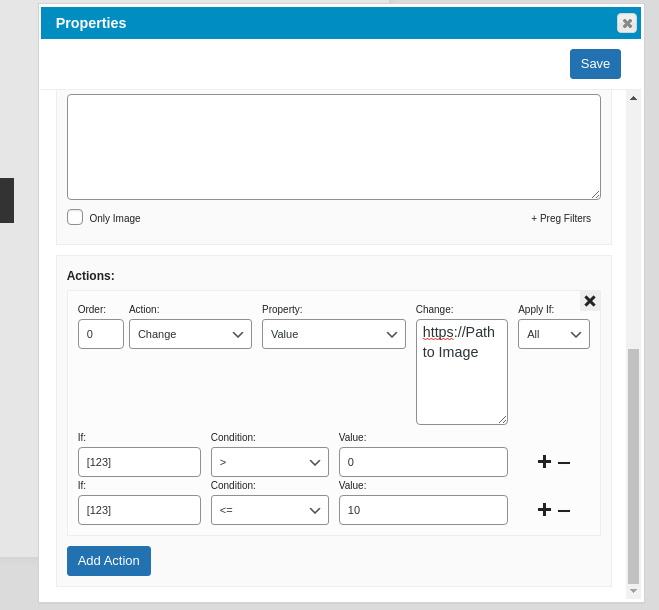
It looks like you need to use "Actions" and "Conditions". It will be need to use some "hidden" field which will have some value by which you will switch properties/values. For example for "Rectangle" you must be able to change color / size. For images you can set custom image and change it's width / height.

See please screenshots attached with example.

P.S. Unfortunately "width" and "height" can't be set as some dynamic value from the form directly, it can be set only as number inside "Action" at this moment, however we will review to add its support.

We remain at your service.


We would really appreciate your feedback at WordPress.org!
June 01, 2021 11:05:57
jorgellomb98
Topics: 10
Messages: 19
Hello,
Thank you for your answer.
I think this will suffice our need.
I have just one last question, how can I put the value of a field (an invisible one) of the form in these conditionals? in the instructions it says that I should use a "shortcode", which one/how exactly?
Thank you
June 01, 2021 11:19:24
E2Pdf
Topics: 7
Messages: 3614
Support
If you are using "Formidable Forms" it's just simple shortcodes which is available under Formidable Forms Success Message / Mail Body / Views / E2Pdf Template Visual Mapper. Usually it's [field_id] (for example: [123]) or field key (for example [x95hs]), some extended shortcodes as [123 show="value"] (If checkbox separate values).

To see which value is rendered by E2Pdf you can just create simple "textarea" with needed shortcode and see its output on needed entry. It will be rendered in same way inside "Actions" and "Conditions".

P.S. "Hidden" field not showing inside "Visual Mapper" however you must be able just to use as [123] without issues, where 123 is Hidden Field ID inside Formidable Form.

If you are using other forms then it must be used shortcodes which is available exactly for that extensions.

We remain at your service.

We would really appreciate your feedback at WordPress.org!
June 01, 2021 11:22:21
E2Pdf
Topics: 7
Messages: 3614
Support
Formidable Forms Field ID

We would really appreciate your feedback at WordPress.org!
June 01, 2021 13:29:36
jorgellomb98
Topics: 10
Messages: 19
Hello,
Thank you for your answer.
One last question:
-Is there any limit on how many conditions/actions I can put per object? I would probably need to put 100-120 in each rectangle.
-Is it possible to copy and paste these conditions and actions into other objects (in order not to have to rewrite all of them again)? Keep in mind that my reports will have more than just one page, so I would need to copy these objects (with their respective actions and conditions) or the actions/conditions per se, and then paste them in different pages, would it still be possible?

Thank you
June 01, 2021 13:45:54
E2Pdf
Topics: 7
Messages: 3614
Support
There is no actually limit on "Actions" and "Conditions" however it can affect speed of PDF generation.

As about copying:

If you will create object and will put "Actions" and "Conditions", after this copy this object - it will contain all "Actions" and "Conditions". Unfortunately copying "Actions" and "Conditions" separately doesn't supported yet.

We remain at your service.

We would really appreciate your feedback at WordPress.org!
Get News and Updates
Our monthly newsletter keeps you in the loop, so you'll always be up to date with the latest news and updates about E2Pdf.
* You can update your email subscription preferences here.
All trademarks, service marks, trade names, product names, and logos appearing on this website are the property of their respective owners. The use of trademarks such as Formidable Forms®, Forminator Forms®, Gravity Forms®, JetFormBuilder®, WordPress®, WooCommerce®, WPForms® and others is solely for identification purposes (nominative use) and does not imply any affiliation, sponsorship, or endorsement by the respective trademark holders.
© 2017 - 2026, https://e2pdf.com

We use cookies to collect and analyse information on site performance and usage, to provide social media features and to enhance and customise content and advertisements. By clicking "Accept Selected", you consent to use of selected cookies according to our Cookie Policy.